How EMS Dispatch Algorithms, Tasks, and Operator Panels Work
An EMS dispatch algorithm is the control logic that decides what the plant does, such as charging in cheap hours or holding a demand ceiling, written as code and held in an algorithm library. It runs because it is registered as a task on a schedule, and it can ship an operator panel, which is the live dashboard of controls and readings that lets an operator drive that algorithm without touching its code.
In brief
- Algorithms and tasks are two views of one thing: the algorithm is the code and its configuration, the task is that algorithm registered with the scheduler and running on a cadence.
- Five kinds exist: a task script for control logic that runs every cycle, a monitoring task for data acquisition, a startup task, a shutdown task, and a library of reusable code.
- A site has at most one startup, one monitoring, and one shutdown algorithm, and as many periodic dispatch algorithms as it needs.
- The controls an operator sees on the Control Panel are supplied by the algorithm, not by the page. An algorithm with no panel still appears on the dock and can be paused or deactivated.
- Task Manager shows every task live with its state, run count, and an execution time chart colored against its time budget; a run that exceeds its interval shows red.
What is the difference between an algorithm and a task?
Everything the EMS does beyond reading meters is an algorithm running on a schedule. The algorithm is a folder of Python code plus, optionally, a live dashboard of its own called a panel. The task is what actually executes: the algorithm registered with the scheduler and running on its cadence. Which kind of task an algorithm becomes is set when it is created, and choosing the kind carefully matters. A startup task runs once and stops, so control logic written as one never runs again after the EMS starts. If the algorithm has to react to anything, it is a task script.
At the Alpine Ridge Energy Center demonstration site five algorithms are configured: site aggregation as the monitoring task, which reads every device and aggregates the site totals the dashboard shows; site startup and site shutdown; a starter task; and a time of use dispatch script that charges the battery from midday PV and shaves the evening peak.
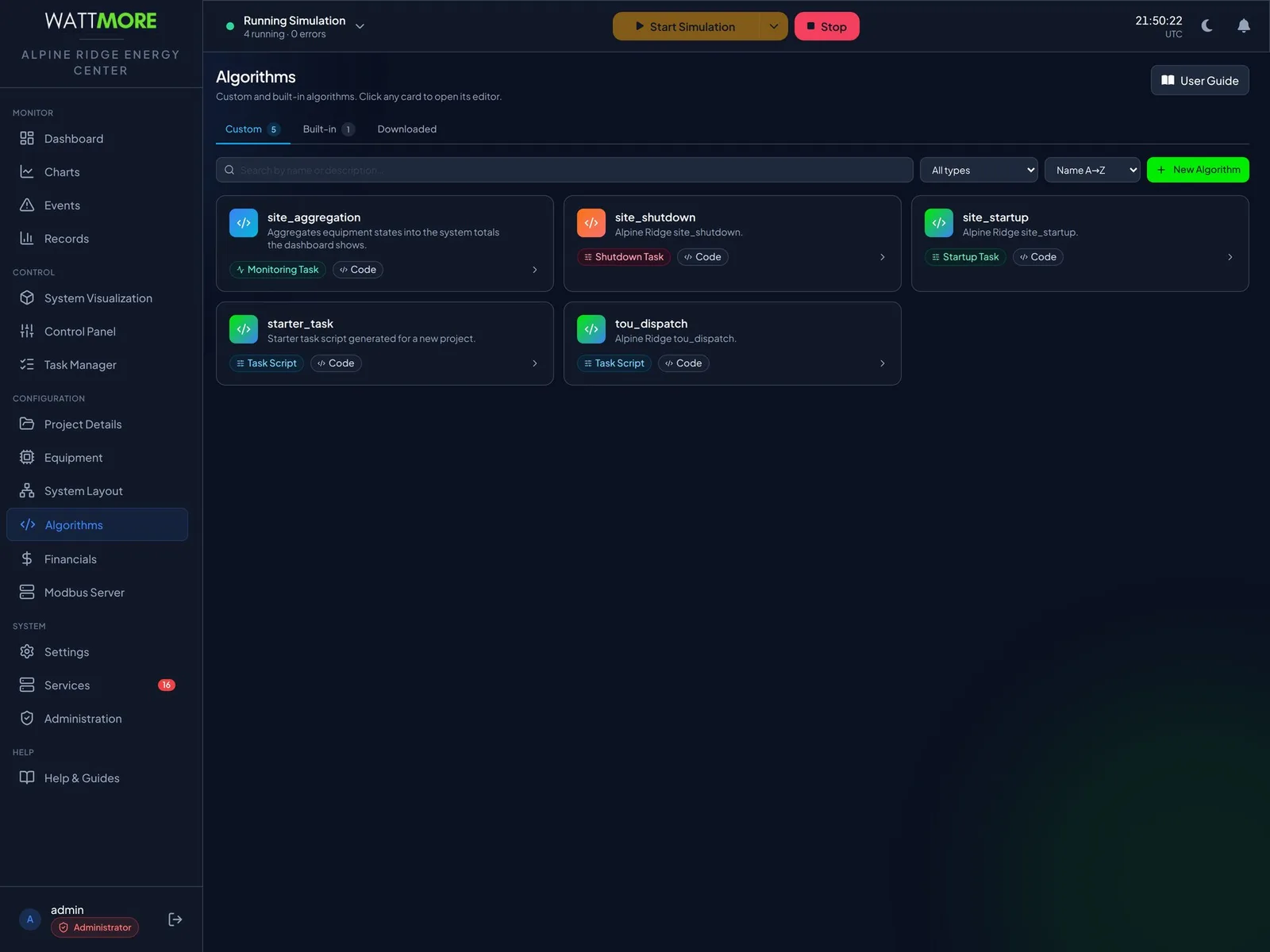
| Kind | How the framework runs it |
|---|---|
| Task script | A class built once, then called every control cycle. Use for control logic and recurring work. |
| Monitoring task | The same pattern, used for data acquisition and monitoring rather than control. |
| Startup task | A single function that runs once when the EMS starts. |
| Shutdown task | A single function that runs once when the EMS stops. |
| Library | Reusable code imported by other algorithms. No runtime loop and no panel. |
How is algorithm code written and edited?
An algorithm opens in a full code editor with syntax highlighting, a minimap, and undo, redo, and wrap. Parts of every algorithm are structural: the class header and the signature of the entry point are how the framework calls the code, so they are locked and appear as shaded bands marked read only. You edit the imports, the body of the constructor, and the body of the entry point. Everything the algorithm needs is handed to it by the framework: its configuration, the live system, a logger, and the platform services.
Rather than remembering the API, calls are inserted from a catalog. The Insert System Function drawer lists equipment, system data, services, panel, and library functions, and its equipment category lists the site’s own equipment, so an inserted call already names the device you meant. Algorithms can also be authored as a flowchart of visual blocks instead of code. Each algorithm has its own version control section where changes are staged, committed with a message, compared, and reverted. Commit before a substantial edit as well as after, because the earlier commit is what lets you compare and revert if the new logic misbehaves on site.
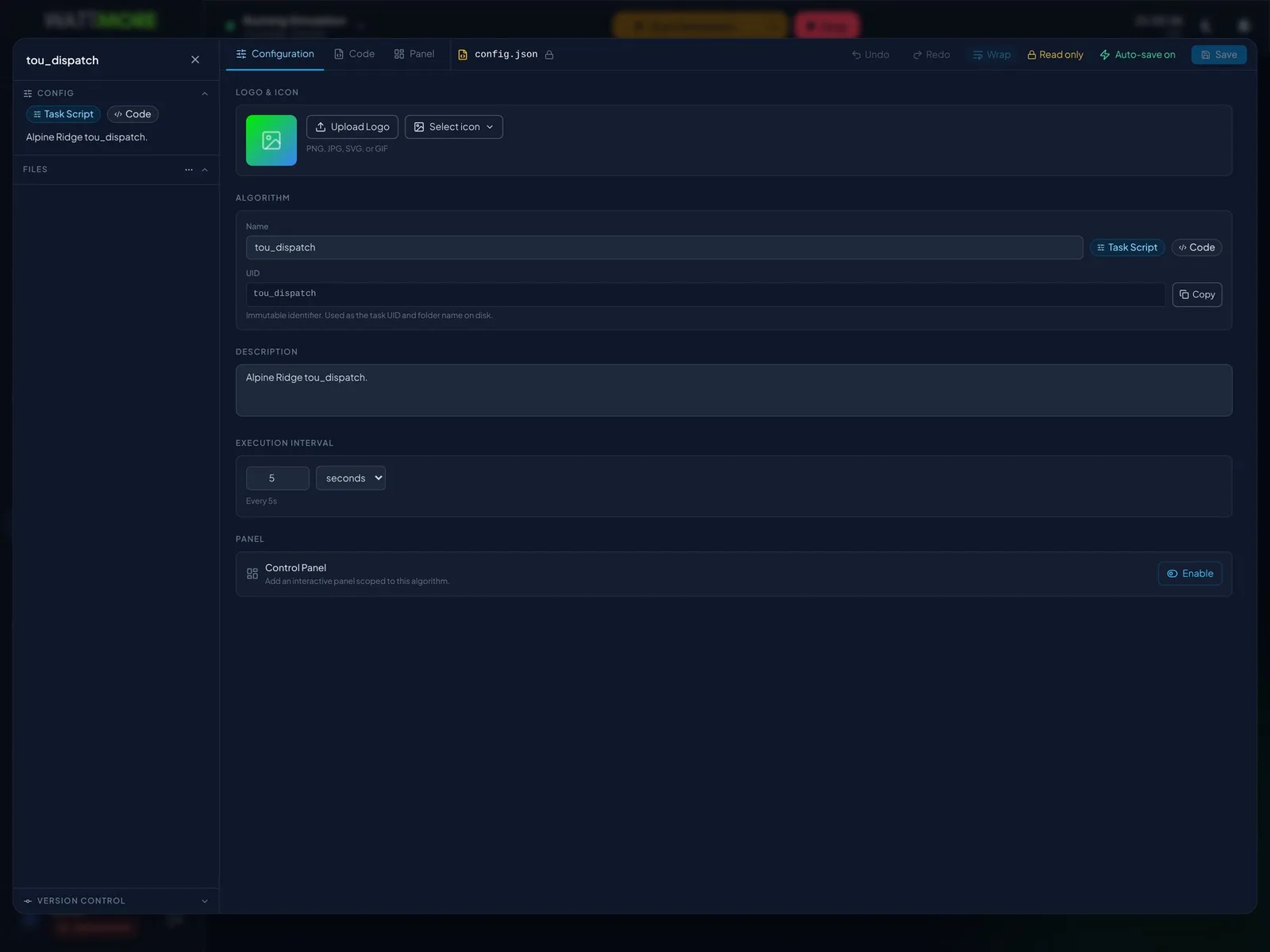
- The code tab saves as you work. An algorithm that is registered as a running task picks up edited code on its next cycle, so edit control logic on a live site only through a planned change, rehearsed in simulation first.
- Built in algorithms open in the same editor with a padlock on their system files. To adapt one to a site, create a custom algorithm of the same kind and copy across what you need; the copy is yours to edit and survives a product upgrade.
- The execution interval is set on the configuration tab and restated in plain terms beneath the field, for example Every 5s, so there is no ambiguity about units. The identifier doubles as the task identifier and the folder name and cannot be changed, so name algorithms carefully when creating them.
What is an operator panel?
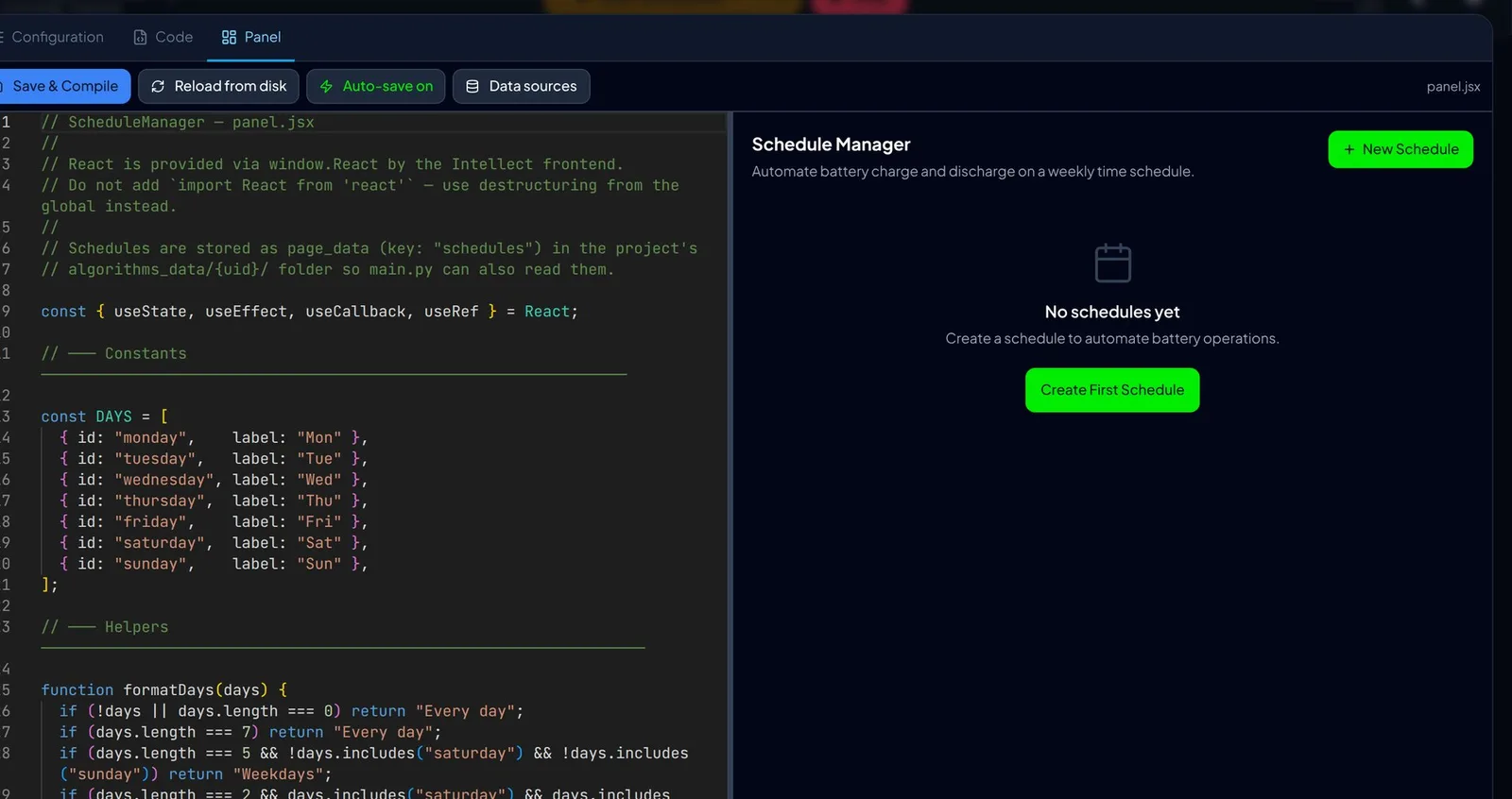
A panel is a live dashboard belonging to one algorithm. It gives operators the controls and readings for that algorithm in one place, without exposing the whole configuration. A dispatch algorithm that ships a panel of schedules, setpoints, and mode switches puts those controls on the Control Panel screen. The panel editor shows source on the left and a live preview on the right, so you see the operator’s view as you build it, and a data sources control declares which registers and devices the panel needs streamed to it.
Unlike code, a panel is compiled before it renders. A panel that is saved but not compiled shows the previous version to operators, which is why Save and Compile is not optional.
How does an operator drive algorithms from the Control Panel?
The Control Panel is where an operator drives the algorithms that run the site. Each activated algorithm sits on a dock along the bottom of the screen, grouped by the point in the run cycle at which it executes: startup, monitoring, periodic, and shutdown. Selecting a tile opens that algorithm’s own panel above, with a header carrying its name, a live status badge, and Home, Deactivate, and Pause buttons that act on the selected algorithm only. An algorithm with no panel, which is normal for startup and shutdown routines, shows its description and the line No panel configured, and can still be selected, paused, and deactivated.
The All tile opens the algorithm library drawer, where each algorithm carries Activate or Deactivate. Activation adds the algorithm to the dock and to the site’s task configuration so that it runs the next time the EMS starts, and it is saved immediately with no separate save step and no undo. For the single slot groups, activating replaces whatever held the slot; the drawer warns that the site’s existing startup, monitoring, or shutdown routine is no longer part of the configuration.
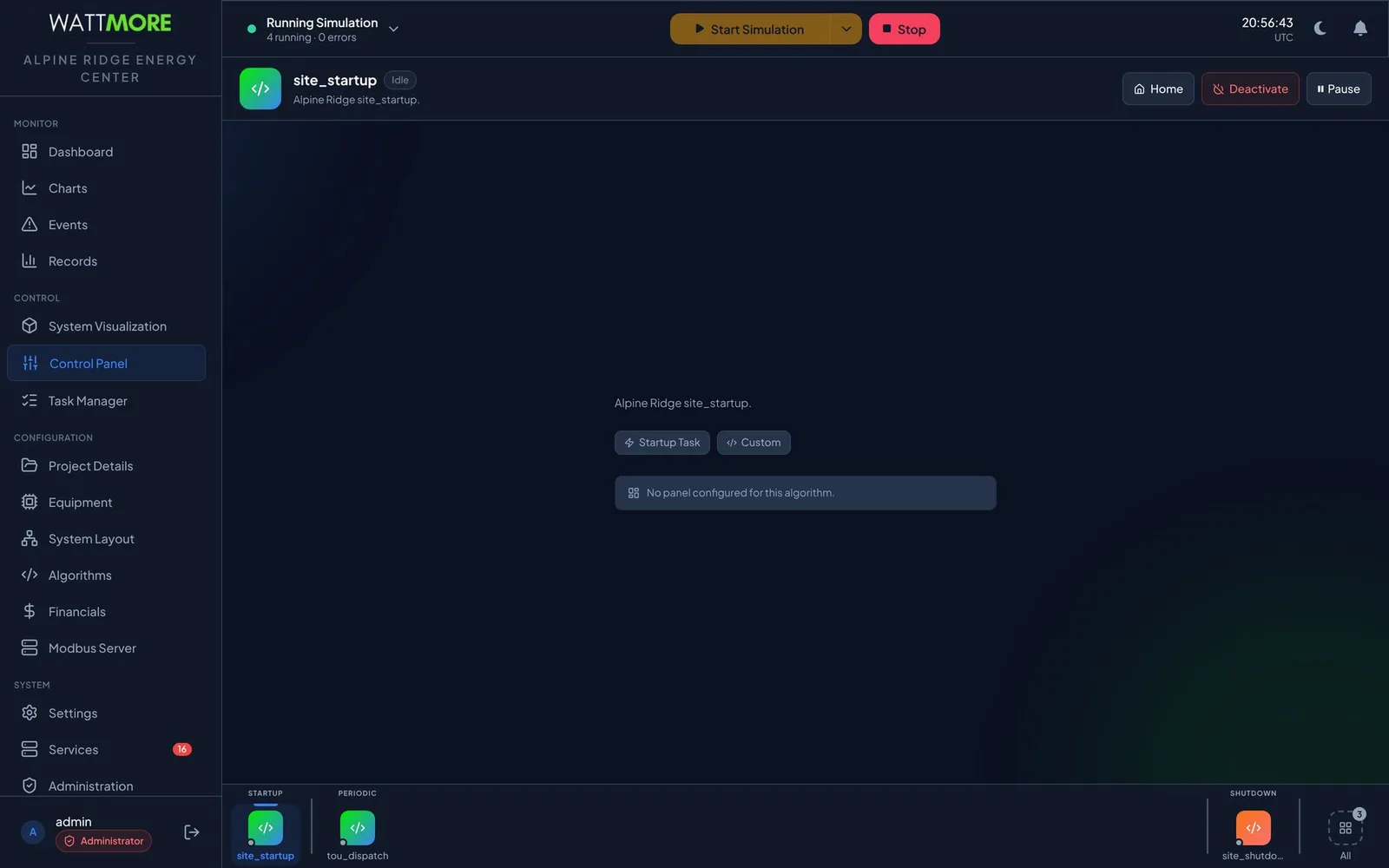
- The status badge takes four values: Running, Paused, Error, and Idle. The small dot on the corner of each dock tile shows the same live state.
- Pause acts on the task carrying the selected algorithm and is enabled only while that task is running. Pausing a dispatch task on a live site leaves the plant at its last commanded setpoint with nothing updating it, and there is no timeout.
- The dock’s right click Deactivate takes effect immediately with no confirmation. Without a shutdown algorithm the next stop has no ramp down step; without a monitoring algorithm the site stops acquiring data at the next start.
What does the Task Manager show?
Every piece of work the EMS does runs as a task: the startup routine, the data acquisition scan, each dispatch algorithm, and the platform’s own maintenance jobs such as database partition creation and data retention cleanup. Task Manager shows all of them on one page, live: what state each is in, how long it has been taking, how many times it has run, and whether it has raised errors. Four counters sit above the list. Total and Enabled describe the configuration; Running and Errors describe what is happening now, and the Errors tile turns red when it is not zero.
Each row carries the task name, a status badge, configuration pills naming the code file, the entry function, and the interval, an execution summary with maximum, minimum, and average time and the run count, and an execution time chart with one bar per recent run. For tasks with an interval, bar color compares each run against its time budget: green within 80 percent of the interval, amber between 80 and 100 percent, red when the run took longer than the whole interval and delayed the next tick. Repeated red means the task cannot finish within its cycle and needs less work or a longer interval.
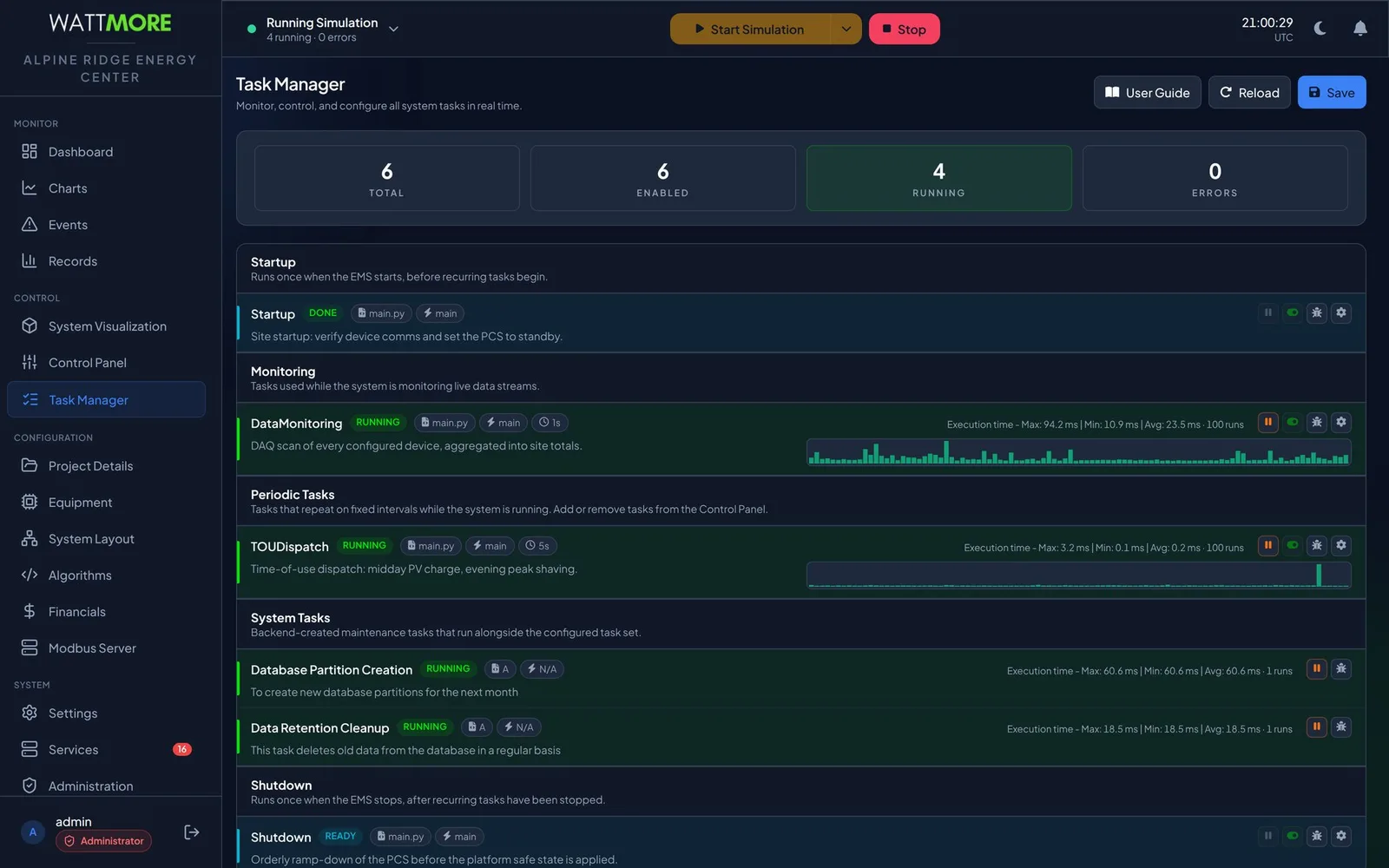

| Badge | Meaning |
|---|---|
| RUNNING | Executing now. |
| DONE | Completed successfully. Normal for the startup task once the EMS is up. |
| READY | Configured and armed but not executing: the shutdown task while the EMS runs, or any task while the EMS is idle. |
| PAUSED | Suspended by an operator. |
| ERROR | The last execution raised an error. |
| DISABLED | Configured as disabled; it will not run at the next start. |
Pause, disable, and errors: three different things
Pausing suspends a running task without stopping the EMS. It takes effect immediately, needs no save, and does not change the configuration; a paused task runs normally at the next start. Disabling removes a task from the next run without deleting it. It is a configuration change: the toggle is available only while the EMS is idle, the change must be saved, and it takes effect the next time the EMS starts. A disabled task is a latent change with no symptom until then, so the Enabled counter is checked against Total before leaving the page.
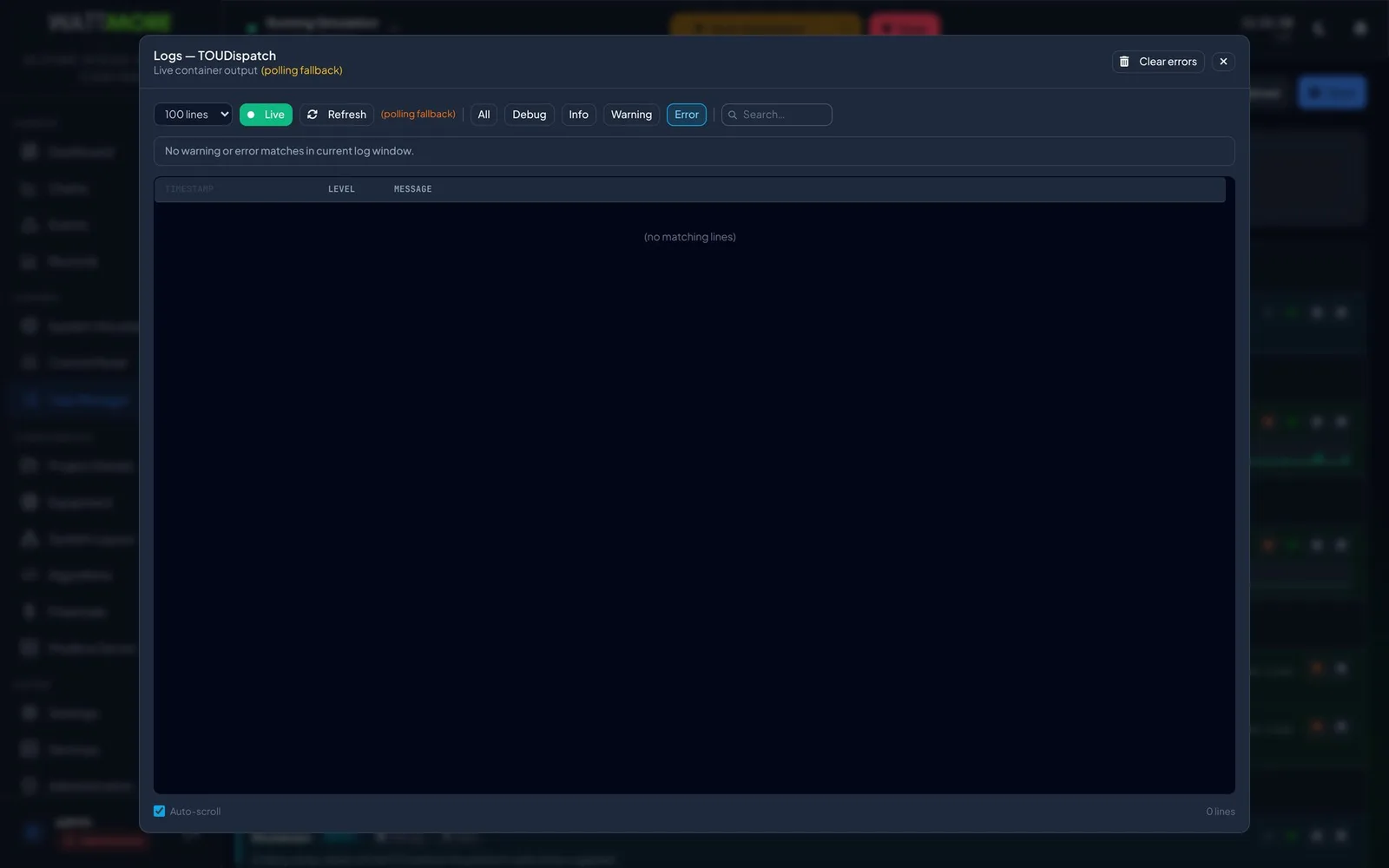
The Errors counter and the red badge on a task’s log control come from the task’s recorded errors for the current session, and they persist across a task restart. The count is a record of what happened, not a statement about this instant. The task’s log window opens on the error filter, widens to all levels for context, and offers Clear errors once the cause is resolved. Clearing errors clears the record, not the fault.
Intellect Operate
Intellect Operate is the WATTMORE energy management system shown in these screenshots. Dispatch logic is Python in an algorithm library, runs as scheduled tasks on the site appliance, and ships operator panels so a control room can drive it without touching code.
Frequently asked questions
- What language are EMS dispatch algorithms written in?
- In Intellect Operate, algorithms are Python. The class header and entry point signature are locked by the framework, and the author edits the imports, the constructor body, and the entry point body. Algorithms can also be built as a flowchart of visual blocks. Operator panels are authored as React components with a live preview.
- How often does a dispatch algorithm run?
- The execution interval is set per algorithm in seconds, minutes, or hours. At the demonstration site the monitoring scan runs every second and the time of use dispatch task every five seconds. Dispatch logic that reacts to load changes belongs on a few seconds; a daily report belongs on hours. Every cycle costs polling and database work, so an interval far shorter than the job needs is wasted effort.
- Can an operator change dispatch behavior without editing code?
- Yes, when the algorithm ships an operator panel. The panel exposes the schedules, setpoints, and mode switches the author chose to expose, and nothing else, so an operator can adjust the strategy within the bounds the engineer set. Activating, pausing, and deactivating algorithms also needs no code.
- What happens if an algorithm takes longer than its interval?
- The execution time chart on the task row shows the run in red, because it delayed the next tick. Occasional red is worth watching; repeated red means the task cannot finish inside its cycle and the fix is to reduce its workload or lengthen its interval. Startup and shutdown tasks have no interval, so only their absolute execution time matters.
- Is activating an algorithm the same as starting it?
- No. Activation registers the algorithm as a task in the site configuration so it runs the next time the EMS starts, and it is saved immediately. Whether the task is executing right now depends on the EMS run state. When the EMS is idle every algorithm reports Idle and Pause is unavailable because nothing is running.
Sources
- INTELLECT EMS 4.0 Operator and Administrator Manual, Chapters 8, 15, and 16, WATTMORE, Inc.
- Energy Storage Handbook, Chapter 15: Energy Storage Management Systems, Sandia National Laboratories for the U.S. Department of Energy
- Energy Storage Handbook, Chapter 23: Applications and Grid Services, Sandia National Laboratories for the U.S. Department of Energy