How an EMS Publishes Site Data to SCADA over Modbus TCP
An EMS Modbus server is the interface through which an energy management system presents its own data to an external master such as a plant SCADA, a historian, a building management system, or a utility gateway, acting as an outstation rather than a client. Instead of each of those systems polling every device on site, they poll one address and read the site’s aggregated power, energy totals, mode and state, dispatch setpoints, and alarm bits in a register map the site controls.
In brief
- Everywhere else the EMS is a Modbus client polling meters, the BMS, and the PCS. The Modbus server turns that around and publishes the site’s story to the systems above it.
- Byte order and address base cause almost every wrong numbers report from an integrator. A mismatch does not fail loudly; it returns plausible looking numbers that are wrong.
- A register map is more often imported than typed. A generic EMS preset publishes site level points for SCADA and historian use and is trimmed to what the integration is contracted to receive.
- Modbus has no authentication and no encryption. Protect the server at the network layer, turn on read only mode unless writes are genuinely required, and enforce an allow list of client addresses.
- Only two inbound paths ever need to reach the appliance: the operator interface over HTTPS and, where a site uses it, the Modbus port from the master’s address only.
Why does an EMS need a Modbus server?
A battery storage site has consumers above the EMS: a plant SCADA that supervises the whole facility, a historian that stores years of data, a building management system, or a utility or aggregator gateway that needs the site’s state. Each could poll every device on site, but that multiplies connections to hardware that often allows only one or two masters at a time, and it leaves each consumer to compute site totals for itself. The EMS already has the totals, the mode, the setpoints it is issuing, and the alarms it has seen.
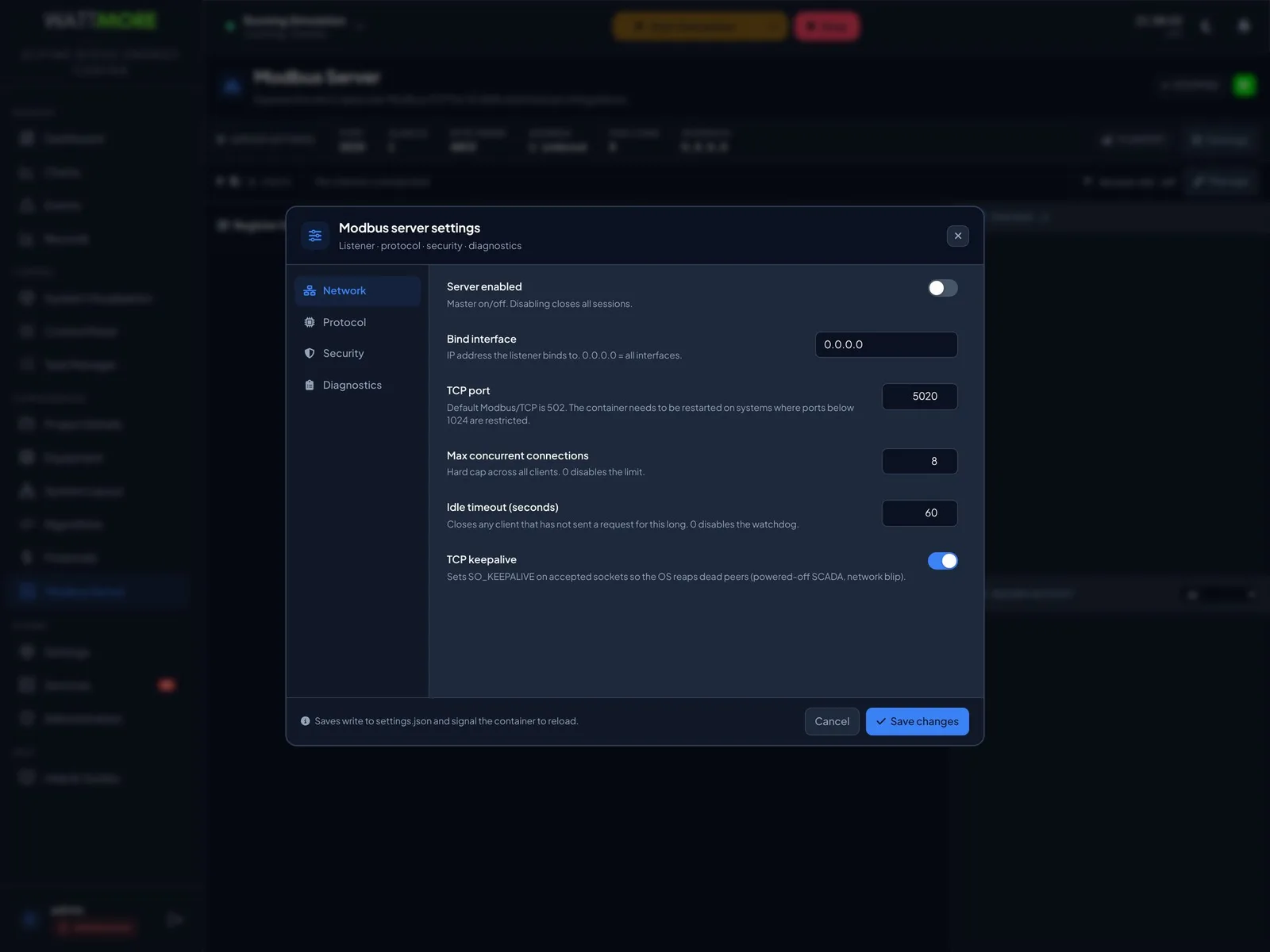
The Modbus server publishes those as a Modbus TCP server. Its page shows a status pill and a strip of the settings in force, the register map in the middle, and a tracked registers rail with a live activity log down the right. The server is off on a newly commissioned site; nothing is published until it is enabled and given a register map.
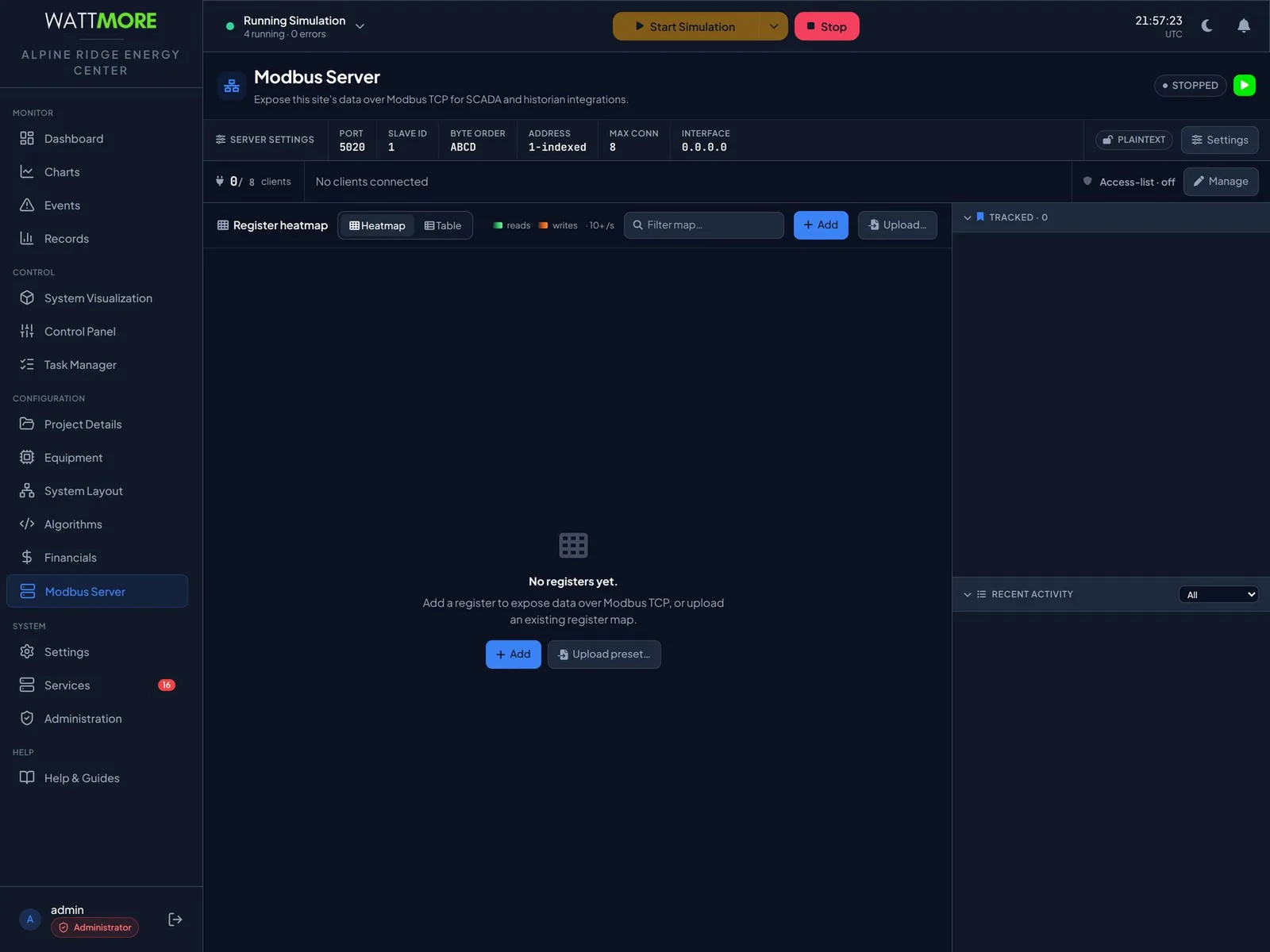
| Field | What it sets | Default |
|---|---|---|
| Server enabled | The master switch. Turning it off closes all sessions. | Off |
| Bind interface | The address the listener binds to. 0.0.0.0 means every interface. | 0.0.0.0 |
| TCP port | The port clients connect to. 502 is the Modbus standard; ports below 1024 are restricted on many systems, so 5020 is a common choice. | 502 |
| Max concurrent connections | A hard cap across all clients. | 8 |
| Idle timeout | Closes any client that has not sent a request for this long, in seconds. | 60 |
| TCP keepalive | Lets the operating system reap dead peers such as a powered off SCADA or a network break. | On |
Which two settings cause most integration failures?
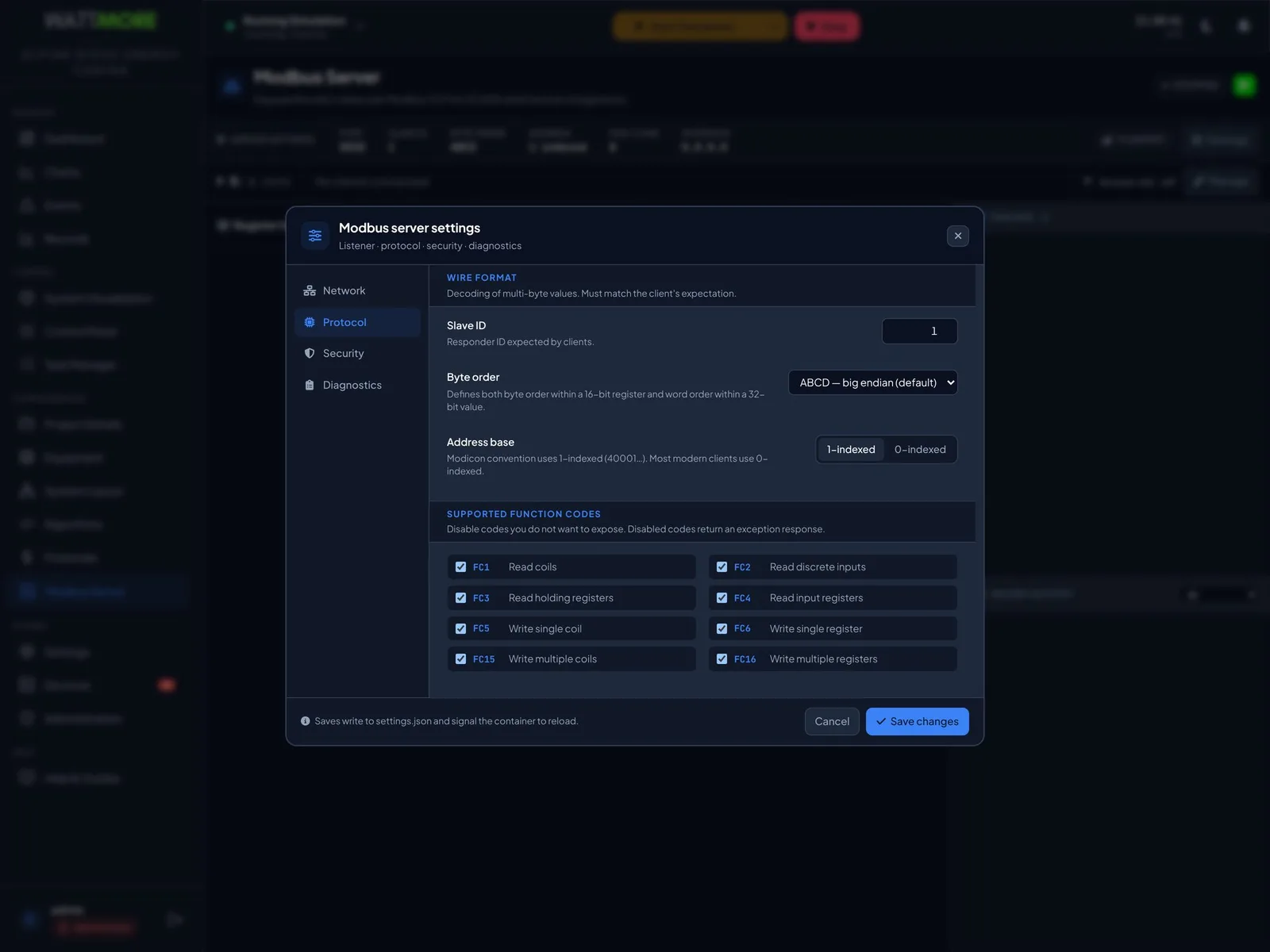
The protocol settings must match what the client expects, and a mismatch does not fail loudly. Byte order sets both the byte order within a 16 bit register and the word order within a 32 bit value, with four choices: ABCD, which is big endian, DCBA, BADC, and CDAB. Address base sets which addressing convention the map uses: the Modicon convention numbers holding registers from 40001, while most modern clients count from zero. Get either wrong and the client reads plausible looking numbers that are not the site’s values.
Agree both in writing before commissioning the link, and record them in the project documents alongside the register map. Eight function codes can be exposed or withheld individually: reading coils, discrete inputs, holding registers, and input registers, and writing single and multiple coils and registers. A code you clear returns an exception response rather than silently failing, which is the behavior a SCADA integrator can diagnose.
What goes in the register map?
The register map defines what the server publishes, and until it has entries the server has nothing to serve. Each register has a unique name, a function code group, an address stored exactly as typed, a data type of unsigned or signed 16 or 32 bit integer, 32 bit float, or boolean, an optional per register byte order override, a scale multiplier, and an optional category for the heatmap view. The map is shown two ways: a heatmap that lays registers out by address and shades them by read and write activity, which makes it obvious which parts of the map a client is actually using, and a table.
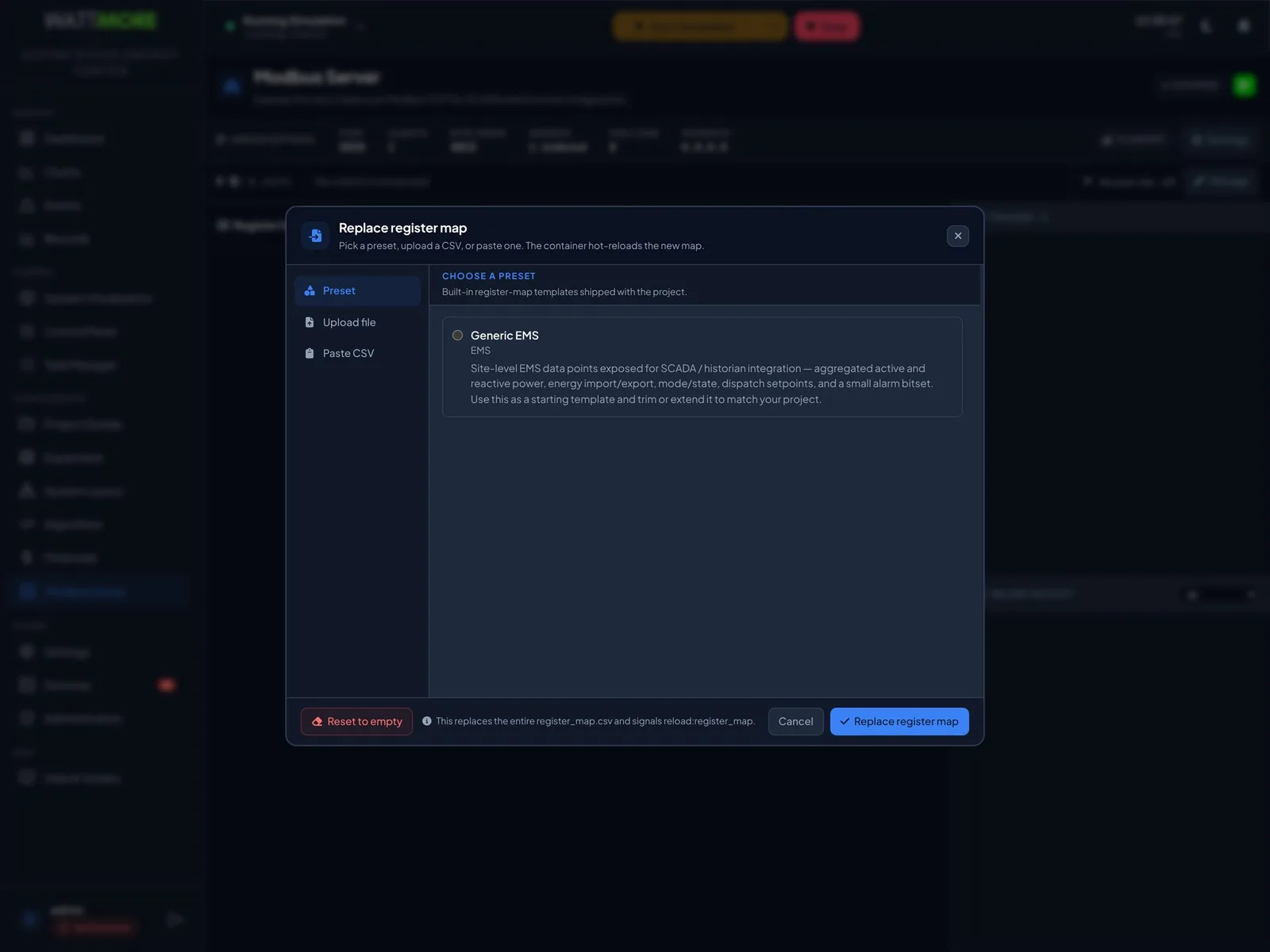
A map is more often imported than typed. Rather than adding fifty registers one at a time, the whole map is replaced in one operation from a preset shipped with the product, a CSV file, or pasted rows. The generic EMS preset publishes site level points for SCADA and historian use, aggregated active and reactive power, energy import and export, mode and state, dispatch setpoints, and a small alarm bitset, and is meant to be trimmed or extended to match the site. Replacing the map replaces every register, including any added by hand, so the existing map is exported first. Adding a single register takes effect immediately; the server reloads the map without dropping connections.
- Track the handful of registers the integration actually depends on, the site power, the state of charge, the mode word. The tracked rail then shows their live values on the same page, which turns commissioning a SCADA link into a two screen job rather than a phone call.
- Publish only what the consumer needs. Every extra register is information disclosed and a value someone may come to depend on.
How is the server secured?
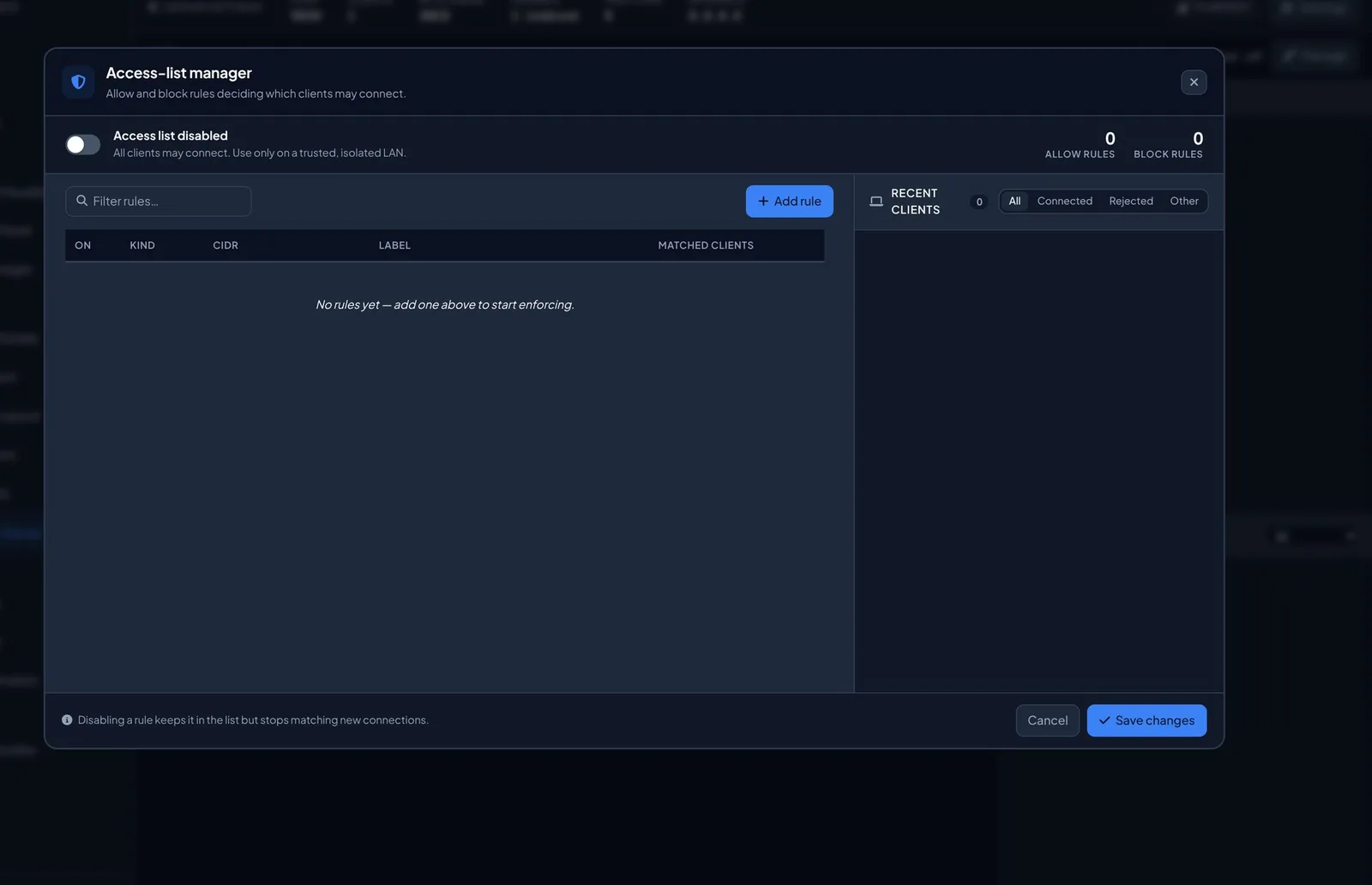
The Modbus protocol has no authentication and no encryption. Any client that can reach the port and address the right unit identifier can read the map and, unless prevented, write to it. The server is protected at the network layer and with the controls on its own page. The access list decides which clients the server accepts, by IP address or CIDR range, with allow and block rules each labeled with the system it covers and a count of the connections it has matched. A recent clients rail lists the addresses that have connected, been rejected, or attempted something else, which is how the real addresses of client systems are discovered before rules are written.
Two settings work with the list. Read only mode rejects every write function code regardless of the per code settings, so a server that cannot be written to cannot be used to command the plant. Allowlist required rejects any connection whose address matches no allow rule. With it off, adding allow rules restricts nothing; enabling the list and requiring the allow list are two separate actions, and both are needed before the access list is a control rather than an annotation.
- Put the server on a segregated network: the SCADA or historian VLAN, never a network reachable from the internet.
- Turn on read only mode unless writes are genuinely required. Most integrations only read.
- Withhold the function codes you do not need. If the integration reads holding registers, clear the four write codes as well.
- Enable the access list and turn on allowlist required, with one allow rule per client system.
- Publish only what the consumer needs. Trim the map to the points the integration is contracted to receive.
- Bind to one interface where you can, so the listener is not present on other networks.
- Keep the idle timeout and the connection cap. They limit what a misbehaving or abandoned client can consume.
- Review the activity log after commissioning. Rejected connections after go live are worth investigating.
What does the site network have to allow?
Only two inbound paths ever need to reach the appliance. Everyone who signs in reaches the operator interface and its API over HTTPS from the office or control room network; it is the only inbound path that carries content. Where a site has one, the SCADA, historian, or third party master reaches the Modbus port from that master’s address only. Outbound, none of the optional functions are required for the plant to run, and each has an offline alternative: license activation falls back to a signed offline file, software updates to local media, audit forwarding to a local spool collected from the appliance, and utility DER polling to schedules entered locally.
From the appliance to the plant, the EMS must reach every device it polls on that device’s Modbus TCP port, commonly 502 but device dependent, and no other master may already be holding the device’s connection slots. Serial devices are reached over RS485 from the appliance’s serial interface and need no network path. A site declared offline blocks every outbound destination at source, which is a stronger statement than a firewall rule because the software stops asking.
| Item | Detail |
|---|---|
| A fixed address | The appliance needs a fixed address on the control network. |
| Operator access | HTTPS from the office or control room network, at the address and port in the commissioning record. |
| Device access | The appliance reaches plant devices on the control network on their Modbus ports. |
| Outbound | Needed only for the optional functions the site is using, if any. |
| SCADA polling | Inbound to the Modbus port shown on the server page, from that system’s address only. |
| Time source | If the site runs one, the appliance should be pointed at it. A drifting clock produces records that cannot be lined up against anyone else’s. |
Intellect Operate
Intellect Operate is the WATTMORE energy management system shown in these screenshots. Its Modbus server publishes site totals, state, setpoints, and alarms to plant SCADA and historians from one address, with an enforced allow list and read only mode.
Frequently asked questions
- Is the EMS a Modbus master or a Modbus slave?
- Both, on different links. Toward the plant it is a client, polling the meters, the BMS, the PCS, and the inverters. Toward the systems above it, the plant SCADA, a historian, or a gateway, its Modbus server acts as an outstation that those masters poll. The two roles use separate settings and separate network paths.
- Why does my SCADA read the wrong numbers from the EMS?
- Almost always byte order or address base. The server publishes 32 bit values in one of four byte and word orders, and numbers registers either from 40001 in the Modicon convention or from zero. A mismatch returns plausible looking values that are wrong. Check both settings against what the client expects, then confirm the register the master is asking for is present in the map.
- Can a SCADA system write setpoints to the EMS?
- Only if the site allows it. Read only mode rejects every write function code regardless of other settings, and the four write codes can also be withheld individually. Most integrations only read. Where writes are required, they are restricted to allow listed addresses and reviewed in the activity log, and the EMS still applies its own control safety limits to anything it is asked to do.
- Which port does the EMS Modbus server use?
- The default is the Modbus standard port 502, but ports below 1024 are restricted on many systems and require a platform restart to acquire. A port above 1024 such as 5020 avoids the restriction, and the demonstration site in the manual uses 5020. The port in force is shown in the settings strip on the Modbus Server page.
- Does Modbus TCP encrypt the data?
- No. Modbus TCP carries no authentication and no encryption; that is a property of the protocol, not of any implementation. The protection is network segregation, an enforced allow list of client addresses, read only mode where writes are not needed, a trimmed register map, and a bind interface limited to the SCADA network.
Sources
- INTELLECT EMS 4.0 Operator and Administrator Manual, Chapter 10 and Appendix C, WATTMORE, Inc.
- Modbus Application Protocol Specification V1.1b3, Modbus Organization
- Modbus Messaging on TCP/IP Implementation Guide V1.0b, Modbus Organization
- IEC 62443, Industrial Communication Networks, Security for Industrial Automation and Control Systems, International Society of Automation